Other tools say you're invisible.
Rankwize helps you find and fix what's wrong.
Being invisible on a prompt isn't a diagnosis. Rankwize matches each prompt to the page in your content library that should be winning, analyzes the gap between your page and the competitor that is winning, and classifies it into one of seven fix types. Page-level gap analysis, not generic visibility tracking.
Your existing content is an asset, not a liability.
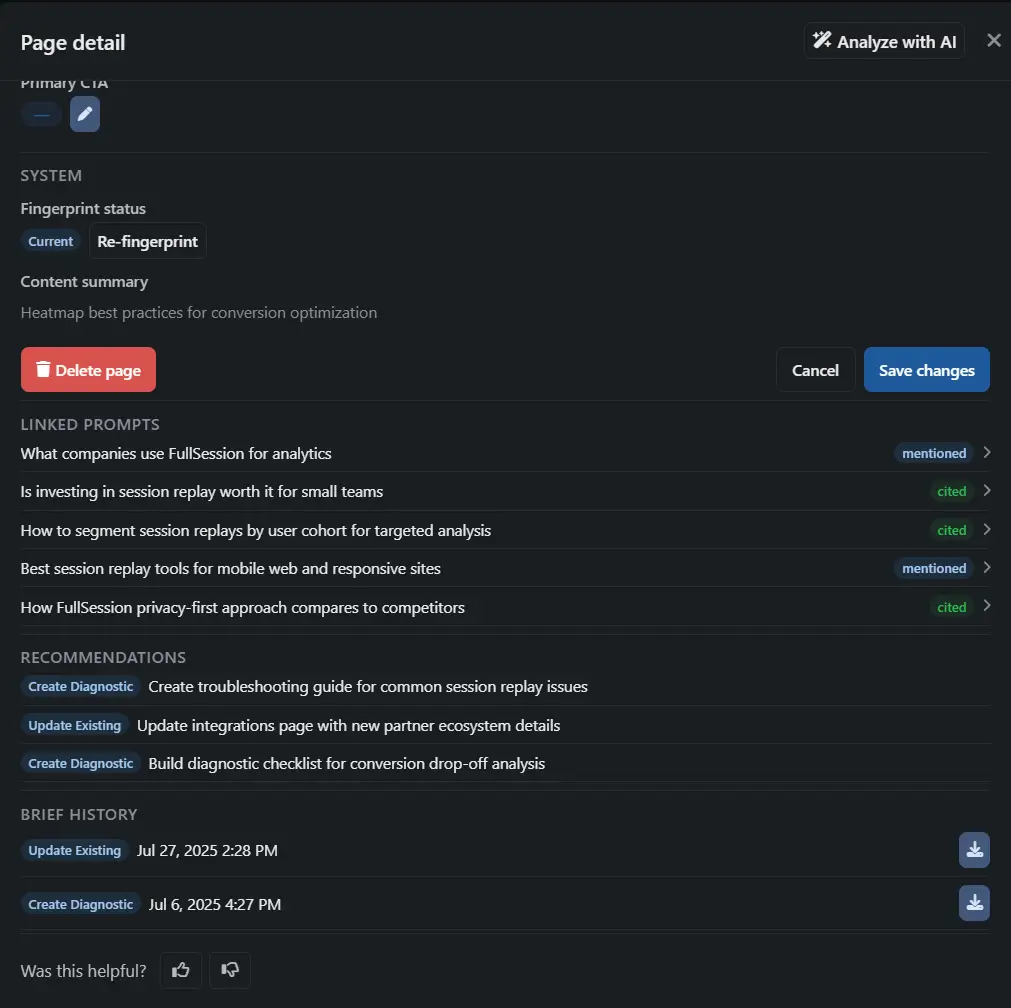
Rankwize fingerprints every page in your content library — extracting topic, summary, primary KPI, CTA, and key entities into a structured profile. This isn't a keyword scan. It's a multi-signal understanding of what each page actually covers and what it's designed to do.
When a monitoring run finds you invisible on a prompt, a weighted multi-signal hybrid matcher scores your full library against that prompt. It finds the page that should be winning — or confirms no matching page exists and flags the gap for new content.
This is the step most tools skip. They find gaps and tell you to write something new. Rankwize checks whether you already have a page that could win with the right fix.
Not 'you're invisible.' Here's exactly what's wrong.
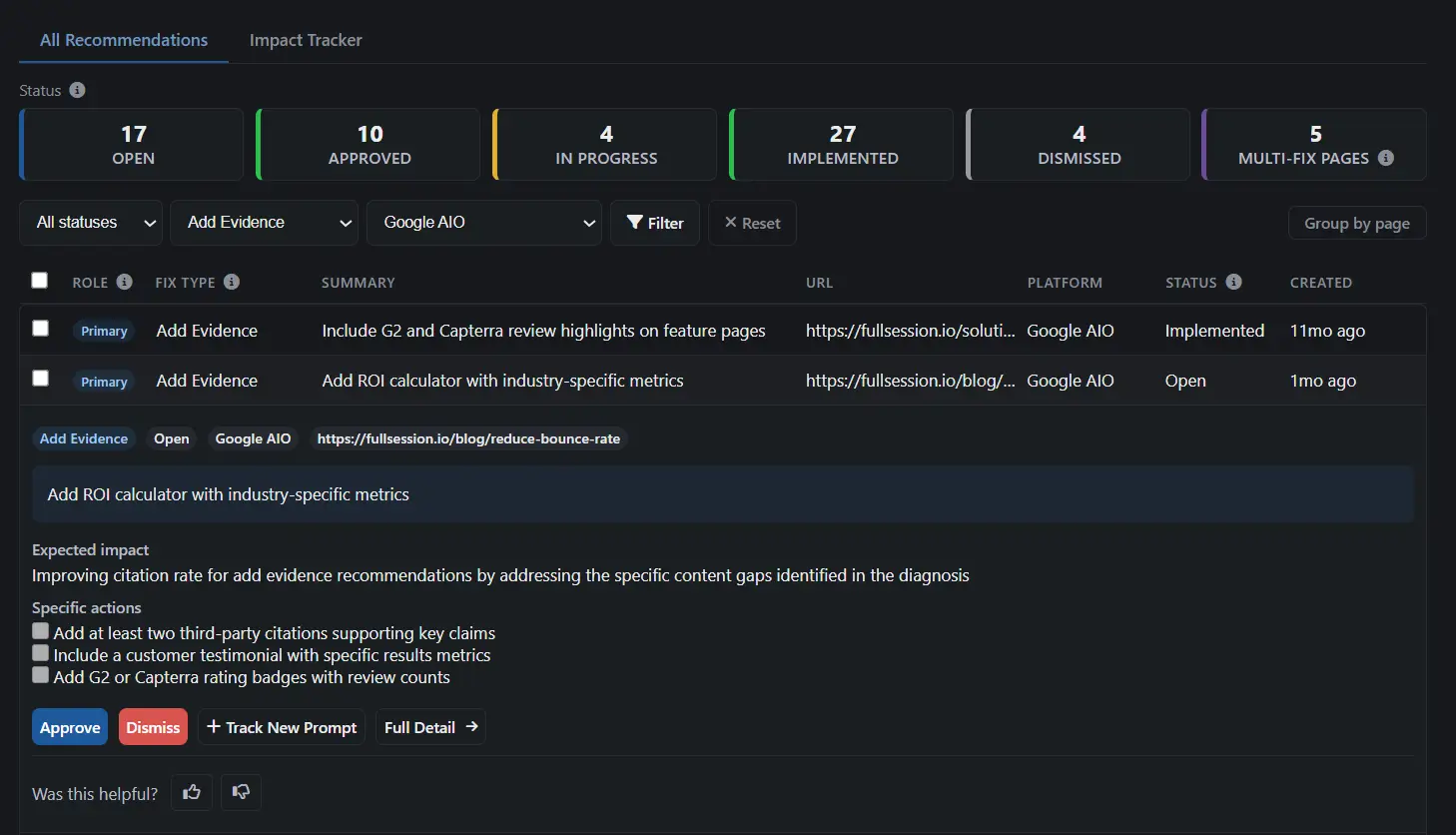
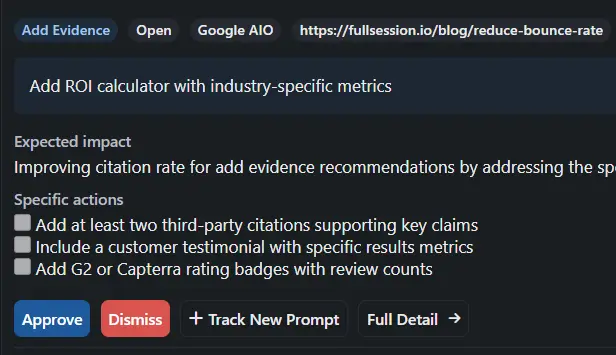
Expand any recommendation to see the full diagnosis. The AI analyzes the gap between your best matching page and the competitor page that's winning the citation, then produces three things: a structured gap summary explaining exactly what the competitor does better, an expected impact assessment, and a specific actions checklist of 3–5 concrete steps to close the gap.
Each diagnosis maps to a fix type — the classification that determines what kind of action will actually move the needle. Not a vague score. A specific problem with a specific remedy.
Get the exact instructions to rank — not just "add a page."
Most tools tell you you're invisible and stop there. Rankwize opens the box: the page to fix, what's missing, and proof it worked. Walk through how every diagnosis is built.
We learn your content
Before anything else, Rankwize indexes every page on your site — what each one is about, who it’s for, and what it’s trying to do. So the moment a gap appears, we already know which of your pages could fill it.
We already know what you’ve got to work with.
Step 1 of 5: We learn your content. Before anything else, Rankwize indexes every page on your site — what each one is about, who it’s for, and what it’s trying to do. So the moment a gap appears, we already know which of your pages could fill it.
Get the play, not a guess
Specific, ranked instructions for the exact page to change — never just “go write another article.”
Stop chasing false alarms
We flag only the gaps actually costing you citations, so you fix instead of second-guessing.
Proof, not promises
See the evidence behind every recommendation, then watch it earn the citation.
Seven problems. Seven different fixes.
Every gap is classified into a specific fix type. Each type maps to a different action — because "write a new article" is the wrong response when your page exists but needs evidence, a stronger CTA, or external validation. Most diagnosed gaps are Update Existing — you usually already have a page that could win with the right fix. Select any fix type to see a real example.
Diagnosis is per-platform, not aggregated.
Cited on Perplexity, invisible on ChatGPT — those are two different problems requiring two different responses. Rankwize keeps every diagnosis scoped to the specific prompt-platform combination where the gap exists. The fix type, the matched page, the gap summary, and the actions checklist are all specific to that platform's version of the prompt.
You're not getting one diagnosis for a keyword and hoping it covers five platforms. You're getting five diagnoses, each grounded in how that specific AI engine responded to that specific prompt on that specific run.
One page. Multiple problems. All surfaced at once.
A single monitoring run can reveal that the same page has several issues: weak evidence, a missing comparison angle, and an unclear CTA. Rankwize surfaces all of them — one primary recommendation (the highest-impact fix) plus up to three secondary recommendations, each with its own fix type and actions checklist.
You see the full picture in one pass. No discovering problems one at a time over weeks of iteration.
Your highest-priority prompts can't silently disappear.
When one of your highest-priority prompts goes from cited to invisible, the system doesn't demote it in the standard rebalancing pass. It escalates into a new diagnosis pass instead.
The escalation carries a causal signal: STALE_CONTENT_RISK or COMPETITOR_PRESSURE. You see what triggered the escalation, not just that something changed. The right fix for a competitor-pressure escalation is different from the right fix for stale content — and the signal tells you which one you're dealing with.
Your matched page is aging past the decay window for its content type.
A competitor page has recently gained citation share on this prompt.
Frequently asked questions
What are the seven fix types? ↓
Update Existing, Add Evidence, Create Comparison, Create How-To, Create Diagnostic, Improve CTA, and Offsite Seed. Each invisible prompt gets exactly one primary fix-type classification, with up to three secondary recommendations surfaced in the same pass.
How does content library matching work? ↓
Rankwize indexes every page in your content library — extracting topic, summary, primary KPI, CTA, and key entities. When a monitoring run finds you invisible on a prompt, a multi-signal hybrid matcher scores your full library against that prompt. It either finds the page that should be winning and tells you what the gap is, or confirms no matching page exists and flags the gap for new content.
What is multi-recommendation? ↓
A single monitoring run on one page can find multiple issues: weak evidence, a missing comparison angle, and an unclear CTA. Rankwize surfaces all of them — one primary recommendation (the highest-impact fix) plus up to three secondary recommendations, each with its own fix type and actions checklist. You see the full picture in one pass.
What if there is no matching page in my content library? ↓
The matcher confirms the result as a "no match" and flags the gap for new content. The diagnosis still produces a fix type (typically Create Comparison, Create How-To, or Create Diagnostic) and a brief outline of what the new page needs to cover to win the citation.
What is Gap Escalation? ↓
Your highest-priority prompts that go from cited to invisible get escalated into a new diagnosis pass instead of sitting in the standard monitoring queue. The escalation carries a causal signal — stale content or competitor pressure — so you know what triggered it.
See what's actually wrong with your content.
Page-level diagnosis. Seven fix types. Actionable from day one.