Every diagnosis becomes a specific recommendation.
Every implemented fix gets verified.
Rankwize turns each diagnosis into an executable plan — an AI-drafted page when the gap needs new content, a precise edit checklist when it doesn't — tracks every recommendation through a prioritized workflow, and verifies whether your fix actually moved the citation rate. Per prompt. Per platform.
Two ways to close a gap — Rankwize picks the right one.
Every recommendation arrives with a specific-actions checklist — the concrete steps to win the citation. How you execute depends on the gap, and Rankwize already knows which kind it is.
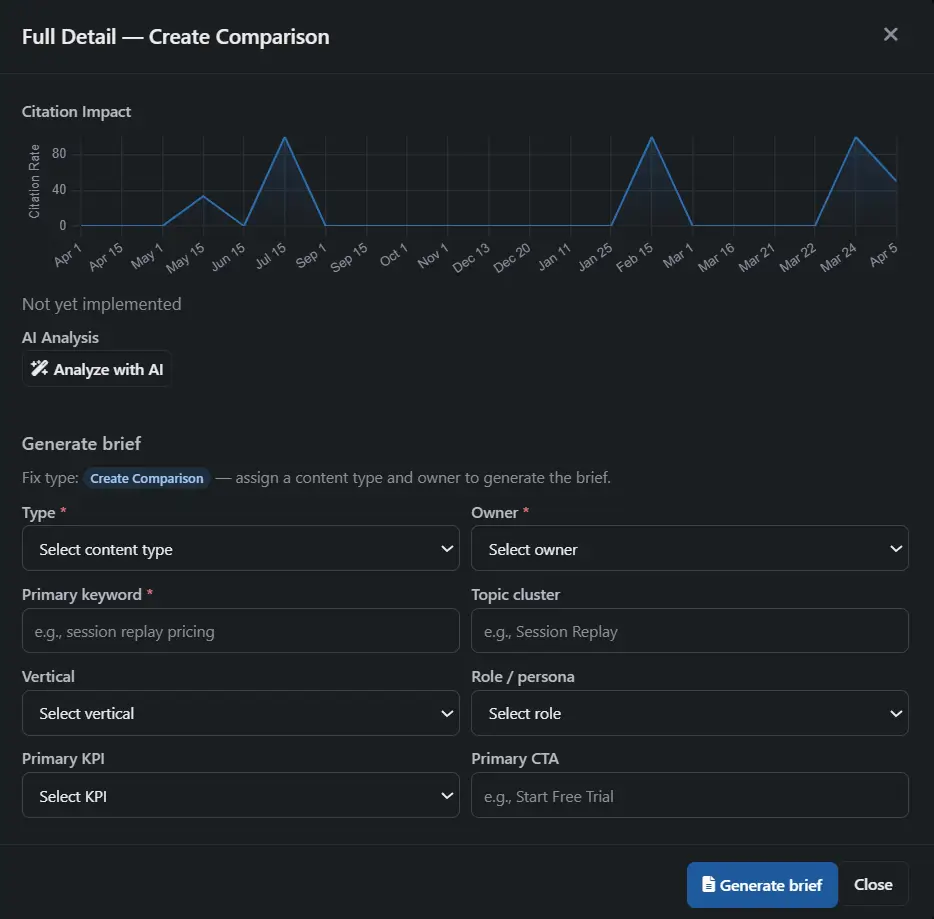
When the gap needs a new page, open the recommendation and click "Have AI draft it." Rankwize spins up a draft in the built-in AEO Editor and writes a full first draft grounded in the gap, your brand voice, and the competitor pages currently being cited. Edit it, export as Markdown or HTML, and publish. Prefer to brief it out? Generate a structured brief and hand it to a writer or an AI tool instead.
When you already have a page that should be winning, there's nothing to write from scratch — you get the exact edit checklist to apply to that page: what to add, what to strengthen, what to change.
Primary fixes first. Secondary fixes next.
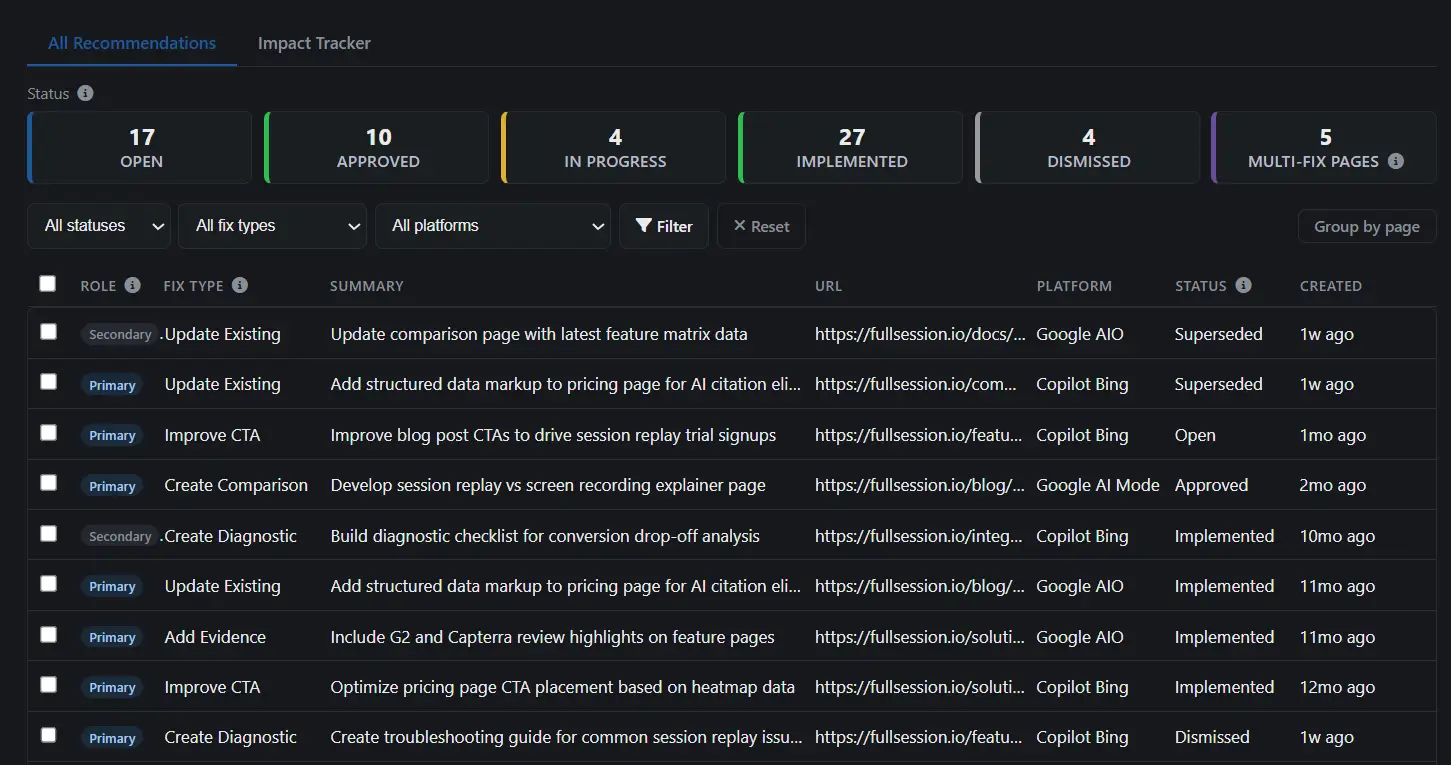
Every recommendation has a role: Primary (the highest-impact fix for that page — address this first) or Secondary (additional improvements that stack on top). This tells your team where to focus without a black-box score.
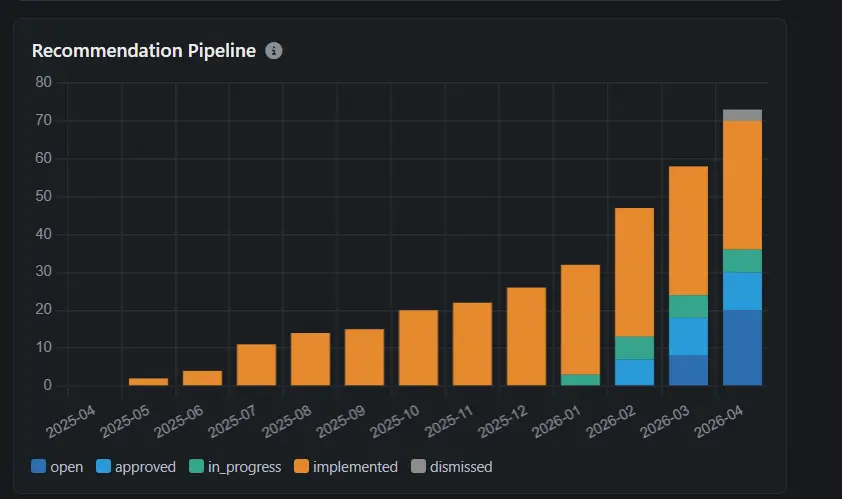
Recommendations move through a clear status workflow: Open → Approved → In Progress → Implemented. Status cards at the top of the list show your pipeline at a glance — how many are open, how many are in progress, how many are waiting for verification. Click any card to filter the list.
Recommendations can also be Dismissed (not worth pursuing) or marked Superseded (replaced by a newer diagnosis).
You shipped the fix. Did it work?
Mark a recommendation as "Implemented" and Rankwize automatically tracks attribution via Impact Tracker. The system re-checks the same prompt-platform combinations that originally identified the gap, then shows you a before/after citation rate chart with the implementation date marked.
The Impact Tracker tab gives you the aggregate view: how many recommendations you've implemented, the average citation lift across all of them, your best performer, and which fixes need attention. Below the summary cards, a per-recommendation table shows the individual results.
No manual re-checking. No guessing whether the content change made a difference. Measured impact, per prompt, per platform.
Learn which fix strategies actually work.
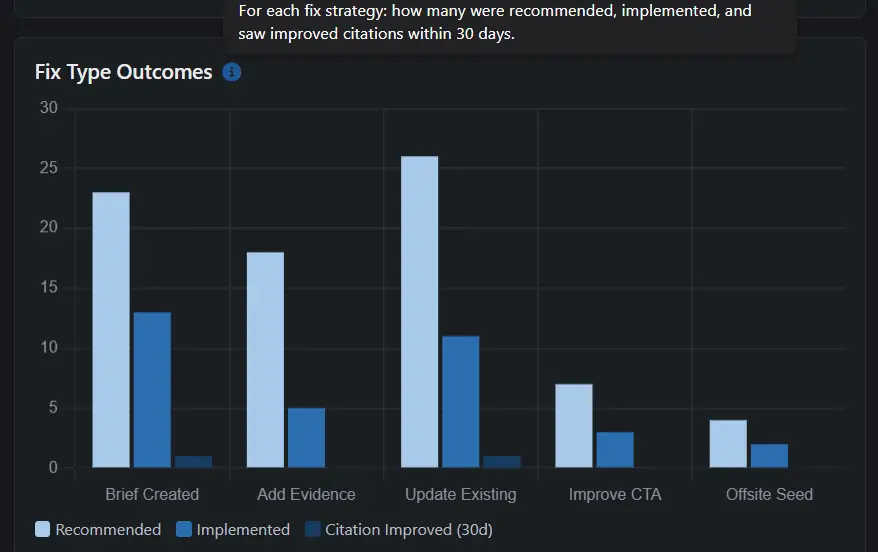
The Fix Type Outcomes chart on your dashboard shows which fix strategies produce citation improvements — by platform, over time. After a few cycles of fixing and verifying, you'll see patterns: which fix types lift citation rates on which platforms, and which ones don't move the needle.
This data comes from your own Impact Tracker results, not industry benchmarks or averages. It reflects how your content performs against your competitors on the prompts that matter to your business. The feedback loop turns AI visibility from guesswork into a system.
Frequently asked questions
How is a brief generated? ↓
On a recommendation that calls for a new page, click "Generate Brief." The form pre-fills deterministically from diagnosis data: content type, primary keyword, topic cluster, vertical, target persona, primary KPI, and CTA — derived from what Rankwize already knows about the gap. The AI contributes only the strategic angle and gap reasoning. The result is a structured brief you can hand to a writer or an AI tool. Or skip the brief and let AI Drafter write the page directly in the AEO Editor.
Can I customize the brief before downloading? ↓
Yes. Every pre-filled field in the brief form is editable before you generate it. The deterministic pre-fill is a starting point, not a constraint — change the content type, swap the persona, or adjust the CTA first.
Where does the brief go after I download it? ↓
Wherever your team works — a freelancer inbox, your content team's tooling, or an AI writing tool. Briefs are structured and intentionally portable. Drafts you write in the AEO Editor export as Markdown or HTML. Either way, Rankwize doesn't push to your CMS or auto-publish.
What statuses does a recommendation move through? ↓
Open → Approved → In Progress → Implemented. Recommendations can also be Dismissed (not worth pursuing) or marked Superseded (replaced by a newer diagnosis). Once you mark a fix Implemented, Rankwize verifies it for you — a re-run 14 days later measures whether your citation rate actually moved. The status workflow gives you a clear pipeline view at a glance.
How do I execute a fix for an existing page vs a new page? ↓
It depends on the gap. When you already have a page that should be winning, the recommendation gives you a precise edit checklist to apply to that page — no new draft needed. When the gap needs a new page, write it right inside Rankwize: "Have AI draft it" generates a full first draft in the AEO Editor, or "Start writing" opens a blank editor. Either way you export Markdown or HTML and publish on your own CMS.
Stop guessing. Start measuring.
From diagnosis to verified fix. Every step tracked.